
Free Fire Sensitivity Review:
Sensitivity is one of the most important gameplay settings in Free Fire because it directly affects aiming speed, camera movement, recoil control, and overall gameplay performance. Players with properly adjusted sensitivity settings often achieve smoother movement, better headshots, and faster reactions during combat.
Many beginners use random sensitivity settings without understanding how they actually work. As a result, they experience unstable aim, inaccurate drag shots, poor recoil control, and inconsistent gameplay.
This guide explains how Free Fire sensitivity works, why it matters, and how players can adjust settings according to their device and gameplay style.
Also learn more about Best Free Fire Sensitivity Settings for Smooth Gameplay.
What Is Sensitivity in Free Fire?
Sensitivity controls how quickly the screen responds to finger movement while aiming or moving the camera.
Higher sensitivity:
- Creates faster camera movement
- Improves quick reactions
- Helps with drag shots
- Increases movement speed
Lower sensitivity:
- Improves aim stability
- Provides smoother recoil control
- Reduces shaky movement
- Supports accurate long-range aiming
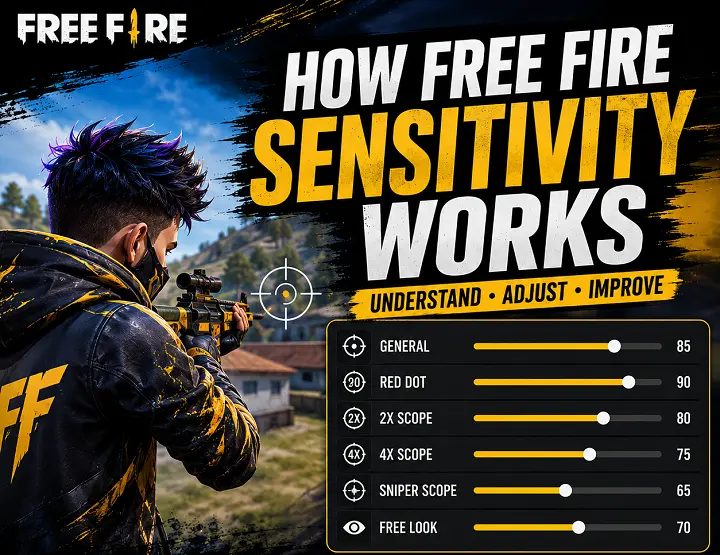
Types of Sensitivity Settings in Free Fire
General Sensitivity
General sensitivity affects overall camera movement and free aiming. Higher General sensitivity helps:
- Improve close-range fights
- Increase drag shot speed
- Improve quick movement reactions
The recommended range of general sensitivity lines between 90 – 100.
Red Dot Sensitivity
Red Dot sensitivity controls aiming movement when using red dot scopes. Balanced Red Dot sensitivity improves:
- Medium-range accuracy
- Headshot precision
- Scope movement smoothness
The Recommended range lies between 85 -95
2X Scope Sensitivity
2X Scope sensitivity affects aiming speed with low zoom scopes. This setting helps maintain:
- Controlled aim movement
- Stable recoil handling
- Better tracking during fights
The recommended range lies between 75- 85
4X Scope Sensitivity
4X sensitivity controls higher zoom scope movement. Lower values improve:
- Long-range aiming
- Scope stability
- Recoil control
The recommended range lies between 60- 75
Sniper Scope Sensitivity
Sniper sensitivity affects aiming speed while using sniper rifles. Lower sensitivity provides:
- Better precision
- More stable long-range control
- Improved target tracking
The recommended range lies between 40- 55
Free Look Sensitivity
Free Look sensitivity controls camera movement while exploring the map. Balanced settings improve:
- Enemy awareness
- Smooth camera rotation
- Faster environment scanning
The recommended range lies between 65- 80
Read more about how to customize Free Fire Gameplay with Clt panel and make the gameplay personalize.
How Sensitivity Affects Gameplay?
Headshot Accuracy
Balanced sensitivity settings help players drag aim smoothly toward enemy heads during combat.
Recoil Control
Proper sensitivity reduces excessive screen movement and improves weapon stability.
Movement Speed
Higher sensitivity improves turning speed and movement reactions during close-range fights.
Scope Stability
Lower scoped sensitivity helps maintain smoother long-range aiming.
Best Sensitivity Settings for Different Devices
Low-End Devices
Low-end devices usually perform better with stable and moderate sensitivity settings.
Recommended settings are
- General: 85
- Red Dot: 80
- 2X Scope: 70
- 4X Scope: 60
Mid-Range and High-End Devices
More powerful devices can handle slightly higher sensitivity settings more smoothly.
Recommended:
- General: 95 – 100
- Red Dot: 90 – 95
- 2X Scope: 80 – 85
- 4X Scope: 65 – 75
These settings improve faster reactions and smoother drag shots.
Also read, How to Install Clt Panel for free Fire and enoy the best features of this incredible tool to make your game more exciting.
Common Sensitivity Mistakes
Using Extremely High Sensitivity
Very high sensitivity may improve speed but often reduces aiming accuracy and recoil control.
Copying Professional Player Settings Directly
Every device responds differently. Professional settings may not work properly on all smartphones.
Changing Sensitivity Too Frequently
Constant changes prevent muscle memory development and reduce gameplay consistency.
Ignoring Device Performance
Lag, FPS drops, and touch delay can negatively affect sensitivity performance.
Tips to Find the Best Sensitivity
- Test settings in training mode
- Make small adjustments gradually
- Focus on gameplay comfort
- Keep graphics settings optimized
- Avoid changing settings daily
Consistency is important for improving aim and reaction speed.
Conclusion
Understanding how Free Fire sensitivity works helps players improve aiming accuracy, recoil control, movement speed, and overall gameplay performance.
Instead of using random settings, players should adjust sensitivity according to their device performance and gameplay style. Balanced sensitivity combined with regular practice creates smoother and more consistent gameplay.
Frequently Asked Questions:
What is the best sensitivity for Free Fire?
Balanced sensitivity settings between 85 and 100 usually work well for smooth aiming and gameplay performance.
Does sensitivity affect headshots?
Yes, proper sensitivity improves drag shots, aiming control, and headshot accuracy.
Why does my aim feel unstable?
Unstable aim often happens because of extremely high sensitivity, lag, or poor FPS performance.
Should low-end devices use high sensitivity?
Low-end devices usually perform better with balanced and stable sensitivity settings instead of extremely high values.
How often should sensitivity settings be changed?
Players should avoid changing sensitivity frequently because stable settings help improve muscle memory.