
Headshots in Free Fire-Review
Headshots are one of the most important skills in Free Fire because they allow players to eliminate enemies quickly and improve combat performance during matches. Players with accurate headshot control usually perform better in ranked gameplay, close-range fights, and squad battles.
Many players struggle with unstable aim, poor drag shots, and inconsistent recoil control because of incorrect sensitivity settings. Proper sensitivity optimization helps improve aiming speed, movement control, and shooting accuracy.
This guide explains the best Free Fire sensitivity settings for headshots, how sensitivity affects gameplay, and the most effective adjustments for smoother aiming performance.
Also visist this page tp learn about Best Free Fire Sensitivity Settings for Smooth Gameplay and make your game load faster and smoother while playing.
Why Sensitivity Matters for Headshots
Sensitivity controls how quickly the screen reacts to finger movement while aiming. Balanced sensitivity settings help players:
- Improve drag shots
- Increase aiming speed
- Control recoil more effectively
- Improve reaction timing
- Achieve smoother gameplay
Incorrect settings may cause shaky movement, inaccurate aiming, and unstable recoil during combat.
Best Free Fire Sensitivity Settings for Headshots
Below are balanced settings suitable for most Android devices.
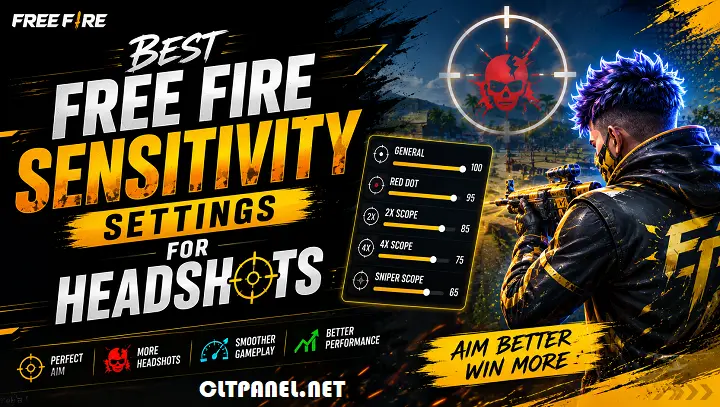
- General
- 90 – 100
Higher General sensitivity improves drag shots and close-range reaction speed.
- Red Dot
- 85 – 95
Balanced Red Dot sensitivity helps maintain smoother aiming during medium-range fights.
- 2X Scope
- 75 – 85
This setting improves recoil stability and tracking accuracy.
- 4X Scope
- 60 – 75
Lower 4X sensitivity helps improve long-range control and scope stability.
- Sniper Scope
- 40 – 55
Balanced sniper sensitivity provides smoother precision aiming.
- Free Look
- 65 – 80
Free Look sensitivity improves map awareness and faster camera movement.
Best Sensitivity Settings for Low-End Devices
Low-end devices usually perform better with slightly more stable settings.
Recommended setup:
- General: 85
- Red Dot: 80
- 2X Scope: 70
- 4X Scope: 60
- Sniper Scope: 45
These settings help reduce unstable movement and improve aiming consistency.
Also learn How Sensitivity Works in Free Fire and adjust your settings according to the game for better performance.
How to Improve Headshots with Better Sensitivity?
1. Practice Drag Shots
Drag shots are commonly used for quick headshots during close-range fights.
To improve drag shots:
- Place the crosshair near the enemy body
- Swipe upward smoothly while firing
- Avoid extremely fast finger movement
2. Improve Crosshair Placement
Good crosshair positioning reduces reaction time.
Players should:
- Keep the crosshair near chest level
- Avoid aiming too low while moving
- Stay prepared for enemy encounters
3. Use Comfortable HUD Settings
HUD layout affects reaction speed and aiming comfort.
Recommended adjustments:
- Keep fire button easy to reach
- Use medium button sizes
- Avoid screen clutter
- Keep important controls visible
Comfortable controls improve gameplay consistency.
4. Maintain Stable FPS Performance
Smooth FPS improves aiming responsiveness and touch accuracy.
Players should:
- Use balanced graphics settings
- Close background apps
- Keep storage optimized
- Avoid overheating during gameplay
Stable device performance improves headshot accuracy.
Best Weapons for Headshots
Some weapons provide smoother recoil control and easier aiming. Recommended weapons are
- MP40
- M1887
- SCAR
- UMP
- Desert Eagle
These weapons are effective for practicing headshots and improving combat skills.
Common Sensitivity Mistakes
- Using Extremely High Sensitivity: Very high sensitivity may create unstable aiming and inaccurate drag shots.
- Copying Professional Player Settings Exactly: Different devices respond differently to sensitivity settings.
- Changing Settings Frequently: Constant changes reduce muscle memory and gameplay consistency.
- Ignoring Device Optimization: Lag and FPS drops negatively affect aiming performance.
Additional Tips for Better Headshots
- Practice regularly in training mode
- Keep graphics settings stable
- Use balanced sensitivity values
- Avoid panic shooting during fights
- Improve movement and positioning
Consistent practice combined with stable settings helps improve overall combat performance.
If you are facing lag issues while playing then must consider to read this article How to Reduce Lag in Free Fire on Android and improve your game by reduing lags.
Final Words
Finding the best Free Fire sensitivity settings for headshots can significantly improve aiming accuracy, recoil control, and gameplay consistency. For all your problems consider Clt Panel APK which is a single app solution to all your issues.
Instead of copying random settings, players should optimize sensitivity according to their device performance and gameplay style. Balanced settings, proper practice, and stable performance help achieve smoother and more accurate headshots in Free Fire.
Frequently Asked Questions
What is the best sensitivity for headshots in Free Fire?
General sensitivity between 90 and 100 usually provides smoother drag shots and faster reaction speed.
Which sensitivity setting improves drag shots?
Higher General and Red Dot sensitivity settings commonly improve drag shot movement.
Can low-end devices achieve good headshots?
Yes, balanced sensitivity settings and stable graphics optimization can improve aiming performance even on low-end devices.
Does FPS affect headshot accuracy?
Yes, smoother FPS improves touch response, aiming control, and gameplay stability.
How can beginners improve headshots quickly?
Beginners should practice drag shots, improve crosshair placement, and maintain consistent sensitivity settings.